Leaving WHOOP without leaving my history behind
How I moved almost seven years of workouts and sleep into Google Health, and the free importer I built to do it
My WHOOP export starts on 12 November 2019. The first row is a boxing session: 30 minutes, strain 12.6, average heart rate 155. The last row is a functional fitness session from this week. In between are 1,847 workouts, 2,368 sleeps and a little over 7,600 answered journal questions. I mean... I did not use the whoop all that time, but most of it.
2019-11-12 00:00:00,2019-11-12 23:22:02,UTC+01:00,2019-11-12 17:04:19,2019-11-12 17:34:50,30,Boxing,12.6,421.0,175,155,0,3,9,86,1,falseThat is almost seven years of training. With some longer Whoop breaks in between. When I decided to move my tracking over to Google Health, I had one condition: that history comes with me.
It turned out to be way less simple than it sounds.
The export is the easy part
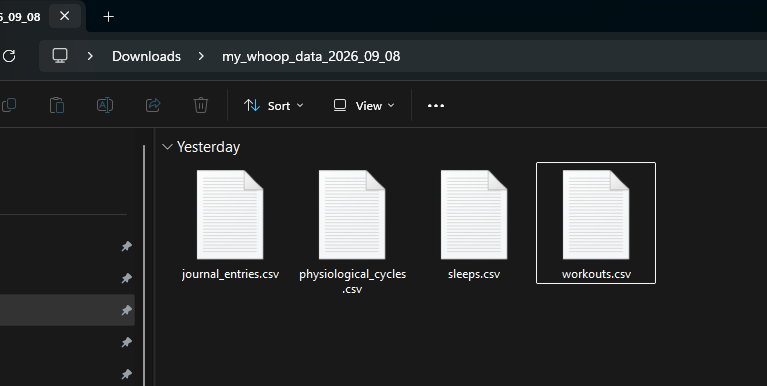
WHOOP gives you your data without a fight. You request an export, you get a ZIP, and inside are four CSV files:
File What's in it workouts.csv Every activity: start, end, type, strain, calories, average and max heart rate, HR zones sleeps.csv Every sleep and nap: onset, wake, and minutes of light, deep, REM and awake time physiological_cycles.csv Daily recovery, resting heart rate, HRV, SpO₂, skin temperature journal_entries.csv The daily yes/no journal
My mix is mostly functional fitness, boxing, plus a long tail of weightlifting, running, yoga, jiu jitsu and the odd trampoline session I'd forgotten about.
So I had the data. I just needed somewhere to put it.
The import button that doesn't exist
Google Health replaced the Fitbit app in May 2026 and is now Google's home for activity, sleep and health data. I assumed there would be an "Import" button somewhere. There isn't.
Crap!!!!
Google Health pulls third-party data in through connections: Health Connect on Android, Apple Health on iPhone, and direct integrations with some services. The only file-style import is for medical records. Google Takeout will happily give you your data out, but there's no way to put a file back in.
WHOOP does sync to Google Health via Health Connect, but that only covers data going forward. My seven years of history had no way in.
The side door: the Google Health API
Alongside the new app, Google released the Google Health API as the successor to the old Fitbit Web API. Most of it is about reading data, but a few data types also support writing. Two of them are exactly the ones I cared about:
exercise, for workout sessionssleep, for sleep sessions with stages
That was enough to work with. I am dev! If I could turn WHOOP's CSV rows into the JSON the API expects and send them one by one, the history would land in Google Health like any other source.
So I built a small importer.
What the importer does
It's a single HTML file. You open it in a browser, drop in your WHOOP CSVs, and it does the rest. Nothing is uploaded anywhere except to Google's own API.
Load the export. It recognises each CSV by its header row.
Build data points. Workouts become
exerciseentries with the correct type, duration, calories and average heart rate, and sleeps becomesleepentries with a stage timeline.Sign in. Paste an access token (more on that below).
Write. Start with a test run of two entries, check the app, then send the rest. It retries on rate limits, keeps a log, and can resume if a run is interrupted.
Undo. If something looks wrong, feed it the log and it deletes everything it created.
The WHOOP strain goes into the workout name, so "Boxing (WHOOP strain 12.6)" is still visible in Google Health.
WHOOP also stores local times plus a timezone offset, so the importer converts everything to proper UTC. Sessions from a US trip don't end up shifted by six hours.
Want to use it for your own WHOOP data? Get in touch and I'll send you the importer.
Getting a token without building an app
This is the part I expected to be painful. Normally, talking to a Google API means creating a Cloud project, an OAuth client, a consent screen, test users and so on.
In the end I didn't need any of that. Google's OAuth 2.0 Playground was enough. These are the two scopes you need, as full URLs separated by a space:
https://www.googleapis.com/auth/googlehealth.activity_and_fitness.writeonly https://www.googleapis.com/auth/googlehealth.sleep.writeonly
Open
developers.google.com/oauthplayground.Paste the scopes above into "Input your own scopes".
Click Authorize APIs and sign in with the Google account you use for Google Health.
Click Exchange authorization code for tokens and copy the access token (it starts with
ya29.).Paste it into the importer.
The token lasts about an hour. If it expires mid-run, click "Refresh access token" in the Playground, paste the new token, and hit Write again. Everything already imported is skipped.
My first attempt failed with Error 400: invalid_scope. If you see that, check that you pasted the full https://… URLs. If it still fails, click the gear icon in the Playground, tick "Use your own OAuth credentials", and use a client from your own Google Cloud project with the Google Health API enabled.
What doesn't come across
I want to be upfront about the limits. It is far from perfect
Recovery, HRV, resting heart rate, SpO₂, skin temperature. The Google Health API can't write any of these. They live only in WHOOP's cycles file. Damn!
Recovery and strain as scores. These are WHOOP's own metrics and have no equivalent in Google Health. Strain survives only as text in the workout name. Damn again!
The journal. There's nowhere to put it. I do not care much.
Sleep stage order. WHOOP's export has minutes per stage, not a minute-by-minute hypnogram. The importer builds a realistic timeline in roughly 90-minute cycles, with deep sleep early and REM late, so the totals per stage match WHOOP exactly. The exact order within a night is reconstructed, not measured. Nice!
Some activity types. Google's docs only confirm a handful of exercise types. The importer tries specific ones like
BOXINGfirst and falls back to a generic workout if the API rejects them. Either way, the name is kept. I am sure this can be done way better of course.Daily totals. Workout calories are stored on the session but don't feed into Google Health's daily calorie totals. That would need minute-level data the export doesn't contain. That's OK.
For me, workouts and sleep were what mattered. Seven years of sessions and nights is the part I'd actually miss.
If you want to do the same
Request your export from WHOOP and unzip it.
Get in touch with me for the importer, then open it in a browser. (Just send me an email, I am happy to share)
Load the CSVs and set the "Up to" date to the day before WHOOP started syncing to Google Health. Otherwise the recent weeks end up in there twice.
Get a token from the OAuth Playground.
Run with a limit of 2, check the entries in the app, then set the limit to 0 and let it run.
Download the import log when it's done. It's your undo button.
Why this matters to me
Training data is a strange kind of personal record. On any given day it's just a number. Over years it's the only honest diary I keep: the months where boxing took over, the stretches where it was all functional fitness, the weeks where sleep fell apart.
Switching devices shouldn't mean starting that diary from page one. WHOOP deserves credit for making the export easy. Getting the data back into another platform was the hard part, and now it doesn't have to be.
But hey: I still got the full data, maybe one day I can import every part of it!
If you want the importer for your own move, or you're stuck on the same problem with a different tracker, get in touch. I'm happy to share the code and help you get it running.